Theme Switcher
Module Install
- Login to the site as Site configurator
- Goto Extend (
/admin/modules) > WSF CH Themes, Switch Page Theme and WSF Theme Switcher module should be enabled by default.
Configuration
- As a site configurator / admin , navigate to admin> config > system > switch Page theme
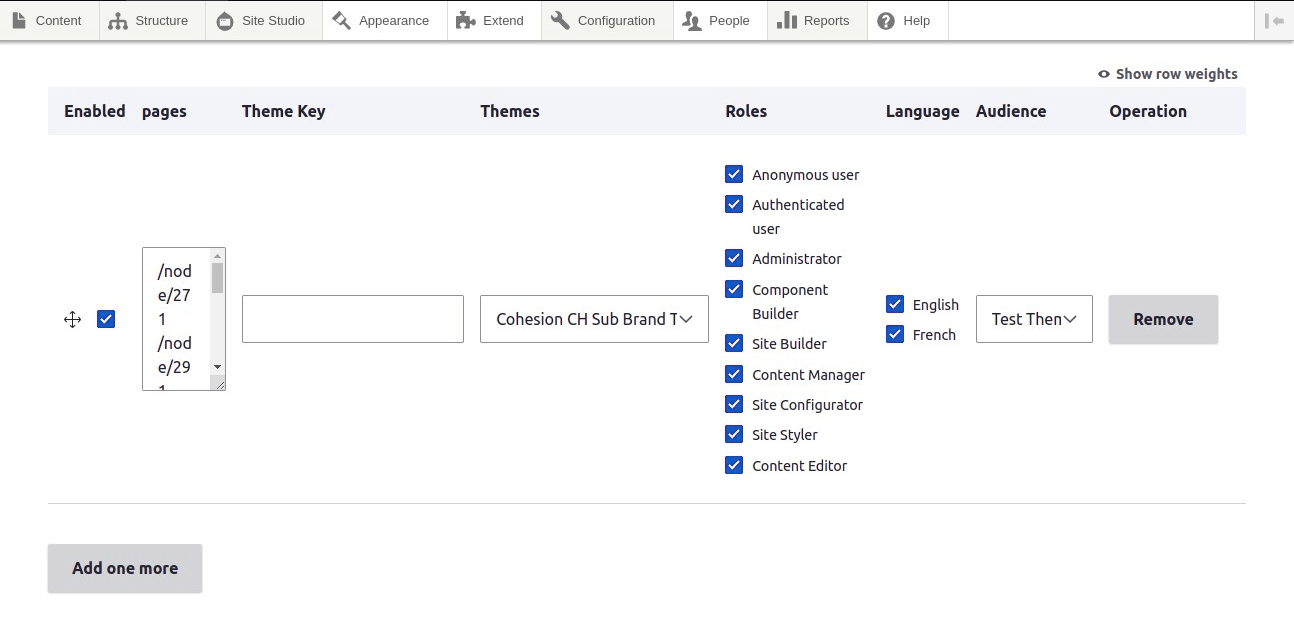
- Provide the required information in the page as below
- Click on enabled checkbox
- Provide the page details (wildcards are also accepted).
- Select the theme from the drop down ( in this case selected the above brand for which changes are done )
- Select the required roles
- Select languages
- Click on save configuration
- Likewise , add required number of pages for which this theme switching needs to be added , by clicking on Add one more row button
- If you do not want to continue the switching , please select or click on Remove button to remove the entire row