Pagination
Pagination can be used to navigate through a number of pages within a content archive. The active page number is highlighted. The 'Back' and 'Next' buttons are inactive when appropriate. Pagination is a foundational function of the platform and will be used to break elongated pages into a more easily consumable format. Pagination will be applied as a standard for pages like search results to break search results into blocks of 10 results to live into a mobile-first approach.
- Overview
- Specification
- Style Guide Manager
- Examples in-situ
- Usage



Specification
This provides guidance on the build, layout and content options for this component.
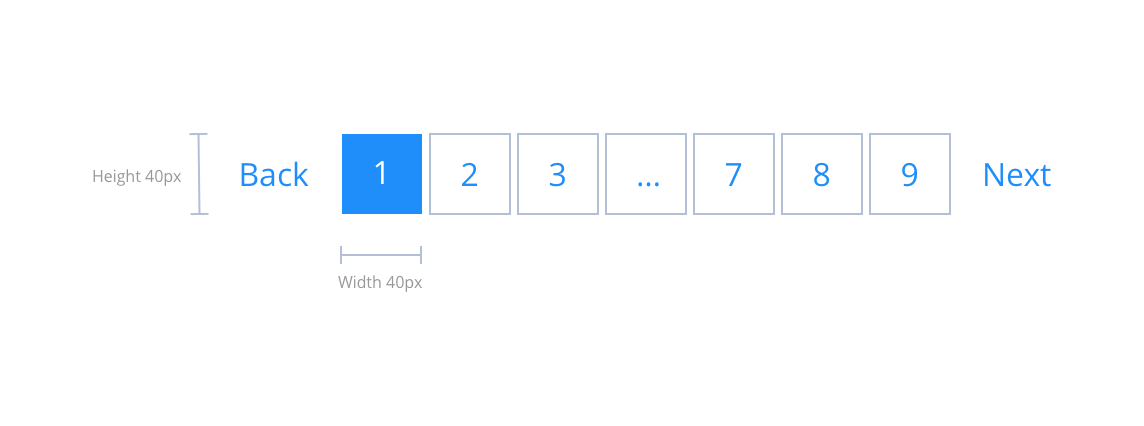
Layout specification
Interaction
These are the interactive aspects of the component.
| Interaction |
|---|
| Clicking a number takes the user to the relevant listings page. |
| Previous/next navigates to next or previous page. |
For the styling, you should follow the specification in the Search results section of this guide.
There are currently no designs available for this.
General usage dos and don'ts
| ✅ Dos | ❌ Don'ts |
|---|---|
| ACCESSIBILITY Controls should have clear labelling. Colour choices should consider the contrast of the text against the background to maintain the 4.5:1 contrast ratio. | |
| Pagination can be applied to other pages as identified by the agency with the standard function outlined below. |